

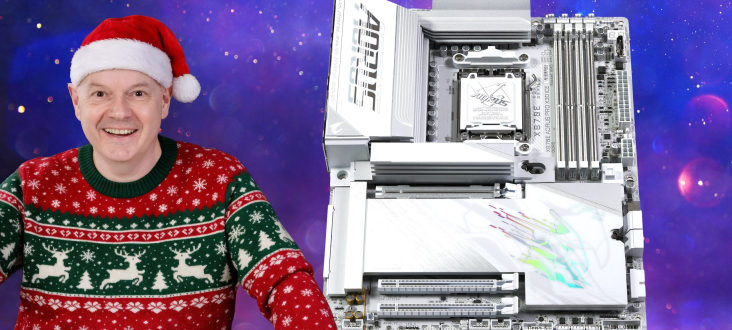

The Gigabyte X870E Aorus Pro X3D Ice motherboard initially appeared to be a straightforward update to the AMD X870E platform. However, a comprehensive review revealed that understanding Gigabyte’s X3D Turbo Mode 2, which incorporates AI, required significant investigation.
Timestamps:
00:00 Start
00:56 Updates and ‘AI Claims’
03:28 Unboxing / Accessories
05:32 Featureset / Ports / Connectors / VRMs
07:11 Removing heatsinks & more connectors
08:45 Back Drilling / Micro holes
09:16 BIOS and AI Claims
09:48 Testing Methodology
10:55 Geekbench 6 Multi Core
12:00 DDR5 8000 tests
12:44 Geekbench 6 Single Core
13:28 Cinebench R23 Multi Core
13:53 Whats going on then?
14:45 Leo gets to the root
15:53 AIDA64 Memory Bandwidth
17:00 Far Cry 6
18:30 Assassins Creed Mirage
19:31 Cyberpunk 2077
20:46 Total War Pharoah
21:45 OnFly Software
22:38 The Experience / Pricing
23:42 Closing Thoughts
Key features
- X870E X3D features vs. previous X870E models
- X3D Turbo Mode 2
- 8 layer PCB with Back-Drill
- DDR5 now up to 9000 MT/sec
- VRM Heatsinks have Direct-Touch Heatpipe
- PCIe Gen 5 x16 not shared with M.2
- All M.2 have EZ Match and not just the main M.2
- All models have Back Armour
- DriverBIOS
- Front USB with 65W PD
- All models have Rear EZ-Buttons
Specification:
- CPU support: AMD Socket AM5 for AMD Ryzen 9000 / 8000 / 7000 Series processors
- Chipset: AMD X870E
- VRMs:
- Infineon XDPE192C3D 12-phase controller
- 18x 110A Infineon PMC41430 Vcore
- 2x 110A Infineon PMC41430 SoC
- 2x 60A DrMOS OnSemi 302155P (Misc)
- Memory support: DDR5 up to 9000 (O.C.), 4x DDR5 DIMM slots up to 256GB; dual-channel architecture; non-ECC unbuffered DIMMs
- Expansion slots: 1x PCIe 5.0 x16 (CPU), 1x PCIe 4.0 x16 (x4, chipset), 1x PCIe 3.0 x16 (x2, chipset)
- Storage:
- 1x M.2 PCIe 5.0 x4 (CPU)
- 1x M.2 PCIe 5.0 x4 (CPU, shared with USB4)
- 2x M.2 PCIe 4.0 x4 (chipset)
- 4x SATA 6Gb/s
- USB:
- 2x USB4 40Gbps Type-C (rear)
- 1x USB 3.2 Gen 2×2 20Gbps Type-C (front, up to 65W PD 3.0 / QC 4+)
- 2x USB 3.2 Gen 2 10Gbps Type-C (rear)
- 5x USB 3.2 Gen 2 10Gbps Type-A (rear)
- 3x USB 3.2 Gen 1 5Gbps Type-A (rear)
- 4x USB 3.2 Gen 1 5Gbps Type-A (front)
- 4x USB 2.0 Type-A (front)
- Audio: Realtek ALC1220 codec, HD Audio 7.1-channel
- Ethernet: Realtek 5GbE
- Wireless: Qualcomm QCNCM865 Wi-Fi 7 and Bluetooth 5.4
- Fan headers: 8x PWM fan headers
- RGB headers: 3x ARGB headers, 1x RGB header
- BIOS: 64MB flash BIOS chip
- Form factor: ATX, 305 x 244 mm
Testing
The X3D Turbo Mode 2 feature required extensive investigation. While “Off” and “Standard” settings were straightforward, “Max Performance” and “Extreme Gaming” profiles presented complexities. As performance charts indicate, “Extreme Gaming” does not consistently enhance gaming performance.
Test system
- Processor: AMD Ryzen 7 9800X3D
- Memory: 32GB ADATA XPG Lancer RGB DDR5-6000
- CPU Cooler: Phanteks Glacier One 360MPH
- Graphics card: MSI GeForce 4090 Ventus 3X 24GB
- Power supply: Seasonic Vertex GX-1200 ATX 3
- SSD: 1TB Crucial T700 M.2 NVMe
- OS: Windows 11
Performance and Overclocking
Geekbench 6 Multi Core
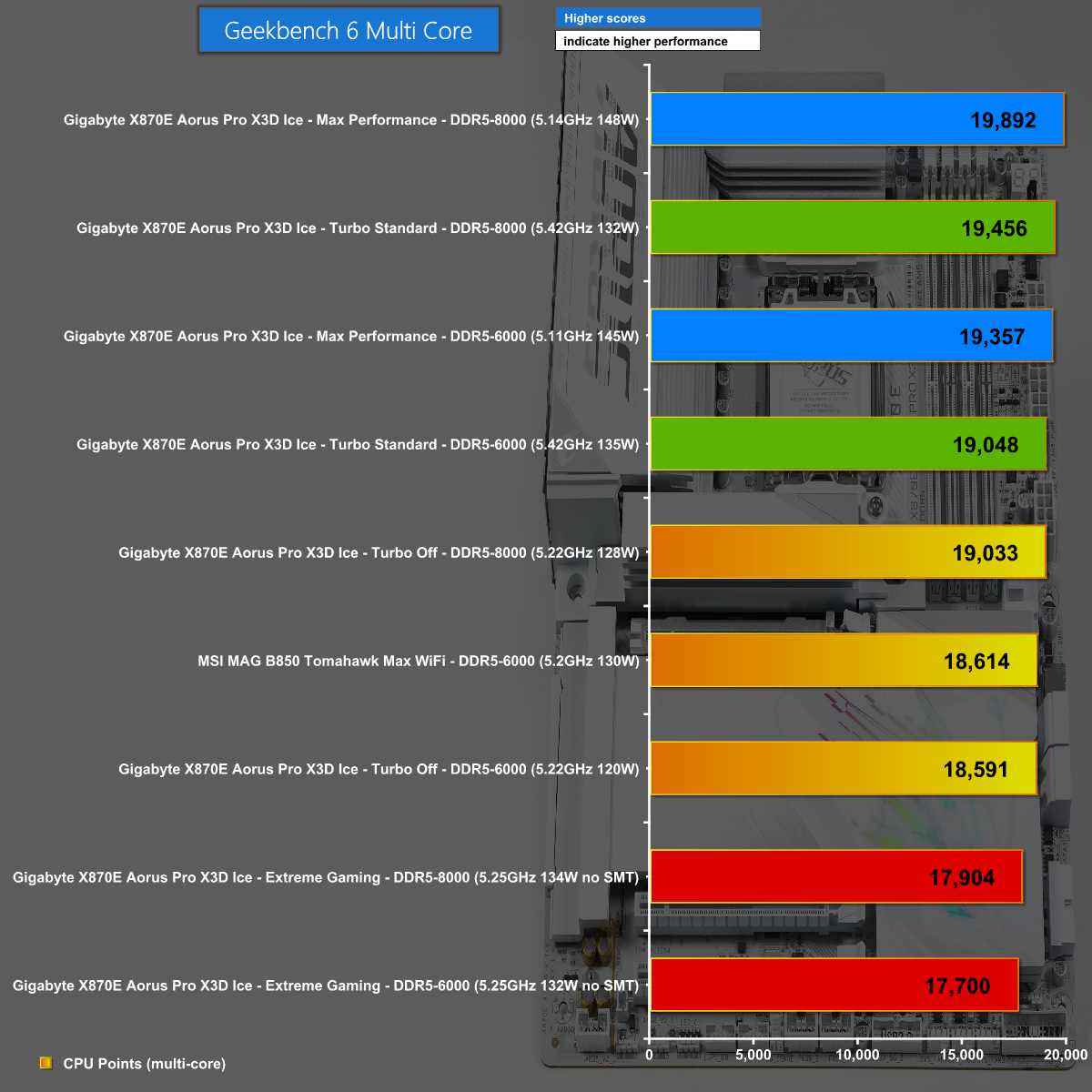
In Geekbench 6 Multi Core, the Max Performance profile with DDR5-8000 memory achieved the highest score. Notably, the Extreme Gaming profile scored significantly lower than the baseline Auto settings, a result attributed to SMT being disabled.
Geekbench 6 Single Core
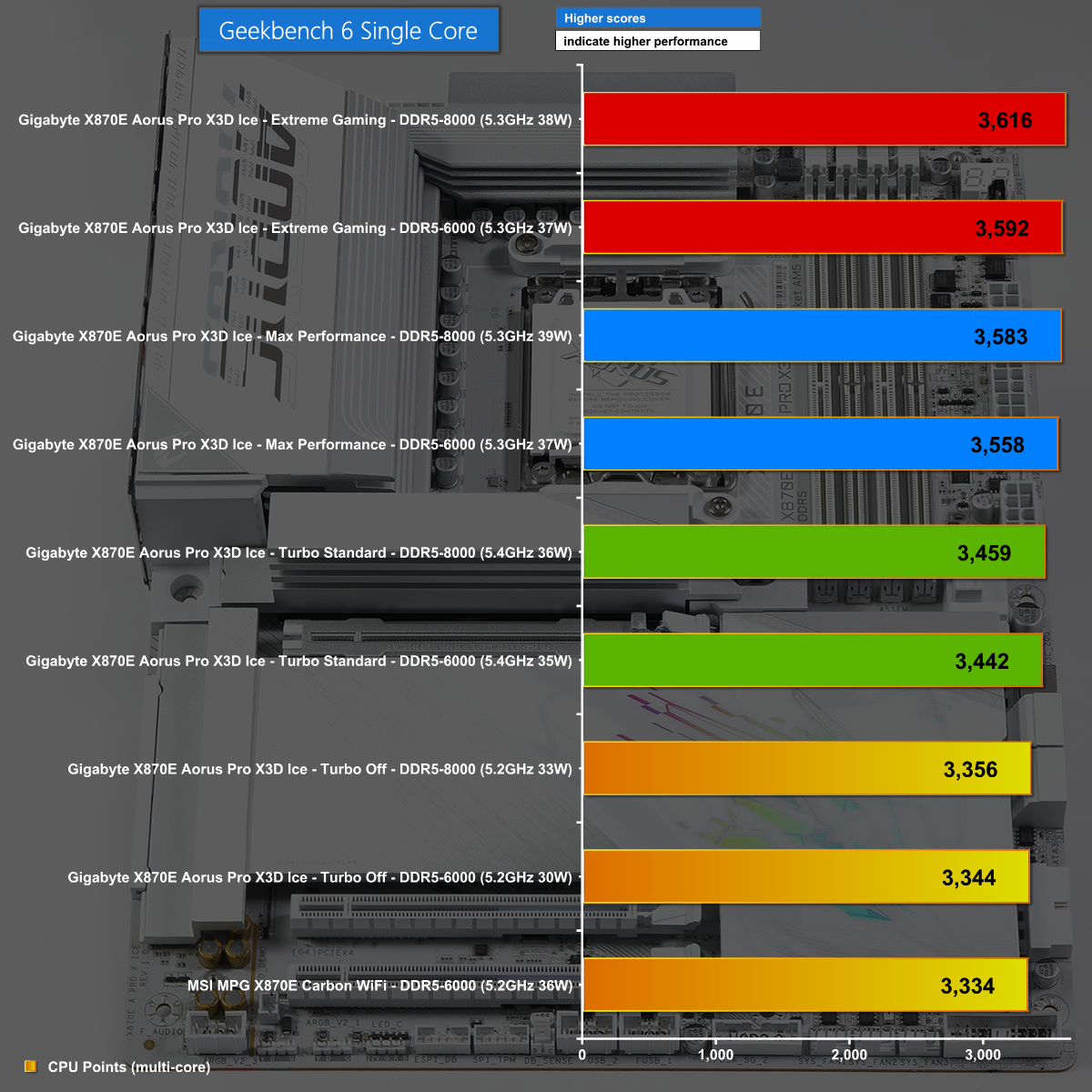
Conversely, the Extreme Gaming profile led the charts in Geekbench 6 Single Core, as each individual core consumed slightly more power and operated at a marginally higher clock speed.
Far Cry 6 at 1080p
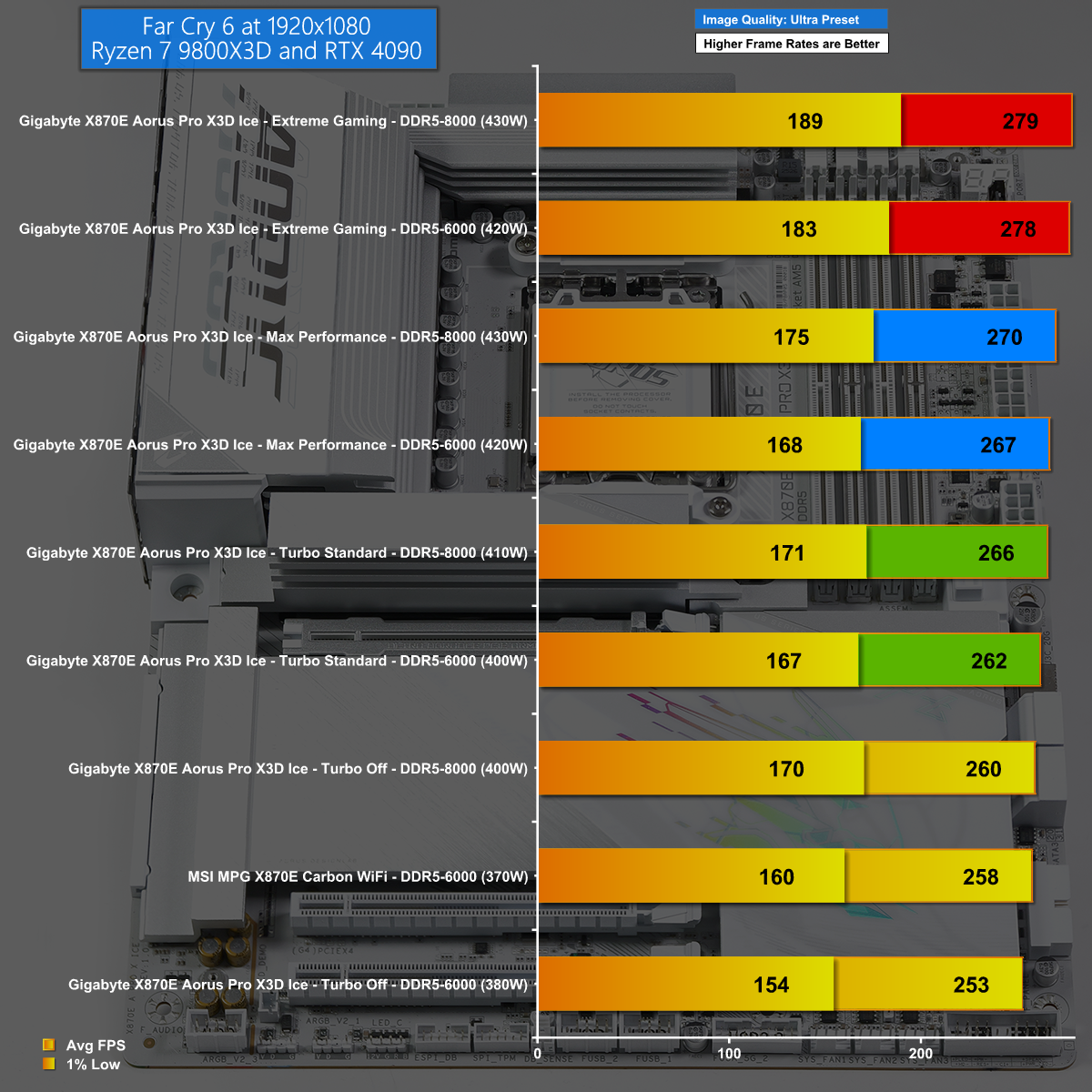
The Extreme Gaming profile secured a comfortable lead in Far Cry 6 at 1080p, benefiting from a combination of high processor speed and modest CPU demands.
Total War: Pharaoh at 1080p
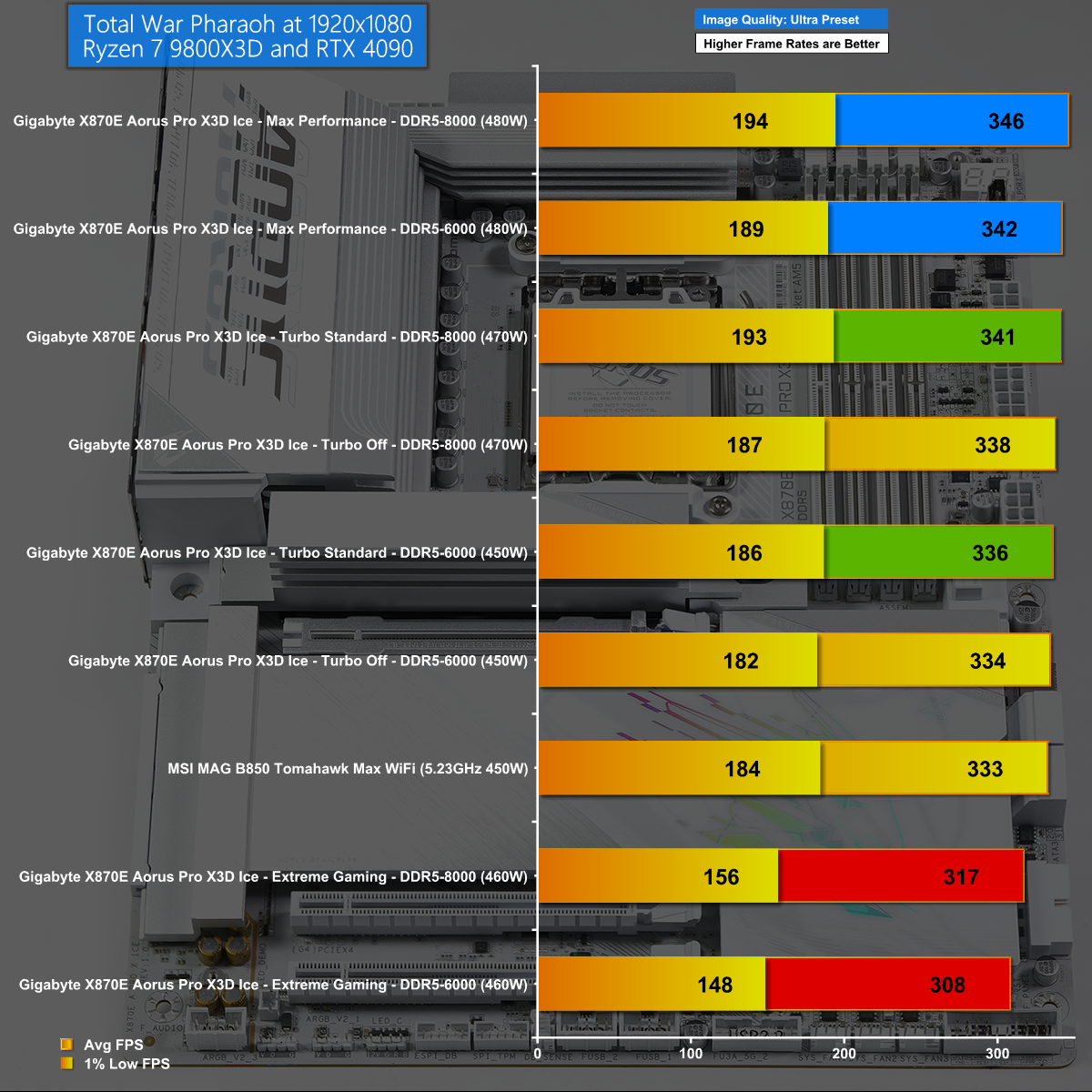
Total War: Pharaoh at 1080p illustrates the potential for complicated performance outcomes. In this specific scenario, the Extreme Gaming profile yielded significantly worse results compared to the default Auto settings.
Closing Thoughts
The evaluation of the Gigabyte X870E Aorus Pro X3D Ice began straightforwardly but evolved into a complex assessment.
The hardware and features of the motherboard are commendable, offering high quality and excellent cooling. For users building a new AMD Ryzen PC, this motherboard presents a strong option when compared to alternatives like the MSI MPG X870E Carbon WiFi (review HERE) and the Asus ROG Crosshair X870E Hero (review HERE).

However, the X3D Turbo Mode 2 settings introduce considerable complexity, leading to inconsistent performance across different applications. A system configured with these settings might excel in one test but perform poorly in another, or show excellent results in one game while struggling in another.
To achieve optimal performance, users may need to conduct multiple benchmark tests, adjusting the Turbo setting between each run. While this iterative process can ultimately yield excellent results, it demands significant effort from the user.
The Gigabyte X870E Aorus Pro X3D Ice is available for approximately £387 HERE.
Pros:
- Abundant ports and connectors.
- DIY features simplify PC assembly.
- High-quality hardware with effective cooling.
- Strong performance (contingent on Turbo Mode 2 configuration).
Cons:
- Turbo Mode 2 requires extensive testing and adjustment for peak performance.
- The price point is relatively high.
