

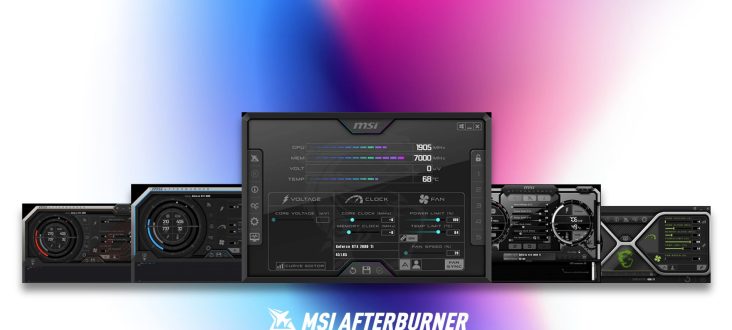
MSI Afterburner 4.6.7 Beta 2 is a significant update, evolving the software beyond just GPU tuning to include broader system health monitoring. It now supports the upcoming GeForce RTX 5090 Lightning series and features a new tool to prevent hardware damage linked to problematic 16-pin power connections.
As reported by Guru3D, a new PSU.dll plugin allows Afterburner to gather real-time data from high-end MSI PSUs, specifically the MEG Ai1x00 and MPG Ai1x00TS series. This enables users to monitor PSU metrics like voltage, current, power, efficiency, and fan speeds directly within the software. MPG unit owners can even see per-pin current data for 12VHPWR and 12V-2×6 connectors.
Image credit: Guru3D
The Beta 2 update allows Afterburner to take automatic action upon detecting a power fault. If the PSU reports an overcurrent or a significant current imbalance across the 16-pin connector (a common cause of connector melting), the software can trigger an alarm with an on-screen warning and audible buzzers. Additionally, it can automatically reduce power by loading a predefined “Emergency Profile,” instantly lowering the GPU power limit to reduce thermal stress and allow the user to safely shut down and inspect the cable.
The complete patch notes for MSI Afterburner 4.6.7 Beta 2 are detailed below:
- Added MSI RTX 5090 Lightning cards support
- Improved Voltage/Frequency curve editor:
- Default V/F node size is now configurable via the configuration file, allowing for larger, more comfortable nodes.
- The V/F curve editor window can now be zoomed with the mouse wheel (100%-500% range), also scaling node size.
- Panning the V/F curve editor work area is now possible by holding the right mouse button and dragging.
- A <V> keyboard shortcut restores the default view, resetting zoom and pan.
- Improved linear voltage curve interpolation with a fixed anchor point (<Ctrl> + node dragging). This mode now applies to selections, using the farthest node within the selected range as the anchor.
- Added arbitrary linear interpolation. Select a source node, press <I>, and then click a destination node to generate linearly interpolated frequency offsets between them.
- Improved V/F curve movement with preserved per-point offsets (<Alt> + node dragging). This mode now applies to selections.
- Added a command line switch to load a predefined emergency profile with reduced GPU power consumption (75% power limit on NVIDIA, -25% on AMD). This switch can be selected in the predefined applications list when configuring a command line action for an alarm in the hardware monitoring module.
- Added a command line switch for displaying a custom text message when applying a profile.
- Improved monitoring plugins:
- Plugins can now specify string names for enum values (e.g., “No,Yes” or “Safe,Alarm”) for data sources, which are used in the On-Screen Display.
- Plugins can customize critical threshold options for specific hardware monitoring data sources, replacing “Alarm when value is out of range” with a single custom checkbox. This simplifies enabling pre-configured critical thresholds and alarm settings.
- Added new PSU.dll plugin:
- Provides native hardware monitoring for MSI MEG Ai1x00 and new MSI MPG Ai1x00TS power supplies.
- Offers traditional PSU 12V/5V/3.3V voltages, currents, output power, efficiency, temperature, and fan speed monitoring on MSI MEG Ai1x00 series PSUs.
- On new MSI MPG Ai1x00TS PSUs, it provides additional per-pin current monitoring for 12VHPWR/12V-2×6 connectors.
- For MSI MPG Ai1x00TS PSUs with per-pin 12VHPWR/12V-2×6 current monitoring, the plugin includes two alarm sensors. These report 0 when pin current is safe and 1 if any pin’s current reaches a critical threshold or if the difference between any two pins exceeds a critical delta. This simplifies detection of overcurrent or current imbalance. Both PSU firmware-based and software-based alarm sensor implementations are provided. Software-based alarm sensors allow power users to redefine maximum current thresholds and differences via the plugin’s configuration file.
- 12VHPWR/12V-2×6 alarm sensors integrate with MSI Afterburner’s programmable critical thresholds. Setting a critical threshold for such a sensor enables alarms for 12VHPWR/12V-2×6 overcurrent or current imbalance in the monitoring window, On-Screen Display, sound alarms, loading specific emergency profiles (e.g., with drastically lowered power limits), or even emergency system shutdown.
- These alarm sensors leverage new plugin functionality to simplify critical threshold and alarm configuration. A “Enable GPU Safeguard+” option replaces “Alarm when value is out of range” for these sensors, allowing beginners to enable protective features with one click. Enabling GPU Safeguard+ automatically:
- Enables “Play sound on alarm.”
- Enables “Launch application on alarm,” configuring Afterburner to load an emergency profile with reduced GPU power limit and display a notification about a potential 12VHPWR/12V-2×6 connection fault.
- Experienced users can manually configure and customize alarms, such as disabling sound or applying a different custom emergency profile with lower GPU power limits and additional GPU downclocking.
